When developing ladder diagrams, as well as when programming in any computer programming language, two types of errors are possible. The first type of errors is syntactic. It is easily detected by the program when the CHECK button is pressed. Components containing errors are highlighted in red.
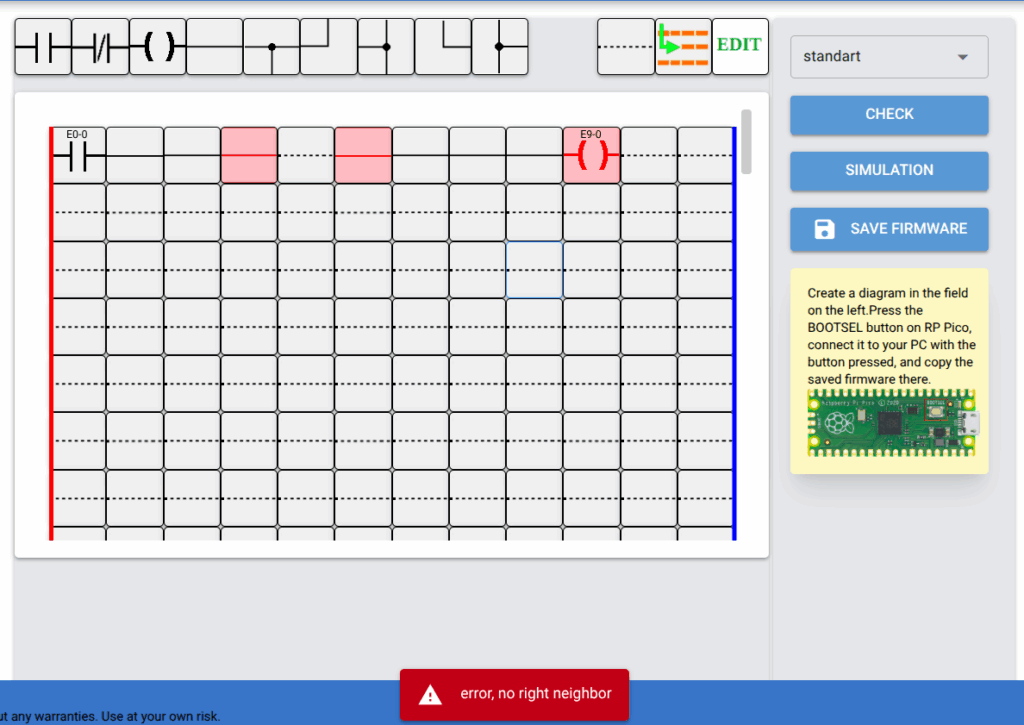
In order to find out in detail what specific error is contained in a given component, it is necessary to left-click on it. A pop-up window with a red background will appear, containing the error message text. A component may contain several errors; in this case, they will be listed in the pop-up window separated by commas.
To save space, the messages are displayed in the pop-up window in a rather short form. A detailed description of the messages is given below.
Error, no left neighbor – the component has no neighboring component on the left, although the component must be connected to it and is not located in the first column of the workspace.
Error, no right neighbor – the component has no neighboring component on the right, although the component must be connected to it and is not located in the last column of the workspace.
Error, no top neighbor – the component has no connection with the component located above it.
Error, no bottom neighbor – the component has no connection with the component located below it.
This component cannot be in the first line – the component cannot be placed first in this row of the workspace.
Error, wrong position for coil – occurs when attempting to place a coil not at the end of a row of the workspace.
Error, in this column can only be a coil – occurs when attempting to place a component other than a coil in the rightmost column of the workspace.
The second type of errors is logical errors. The ladder diagram works, but not as expected, or even worse, a malfunction appears periodically. Identifying such errors is more difficult and time-consuming. The simulation mode available in the LD editor program helps very much with this.
Detailed information about ladder diagram simulation is available here.