Simulation mode allows visualizing the operation of the created ladder diagram without downloading it to a programmable logic controller, which is a significant factor in teaching students programming in the LD language, since it greatly accelerates the learning process.
To start simulation mode, press the SIMULTION button. The ladder diagram will be automatically checked for errors. If no errors are found, simulation mode will start. Editing and modifying the ladder diagram will be disabled. The label on the button will change to IN PROCESS…, and the background of the button will turn green.
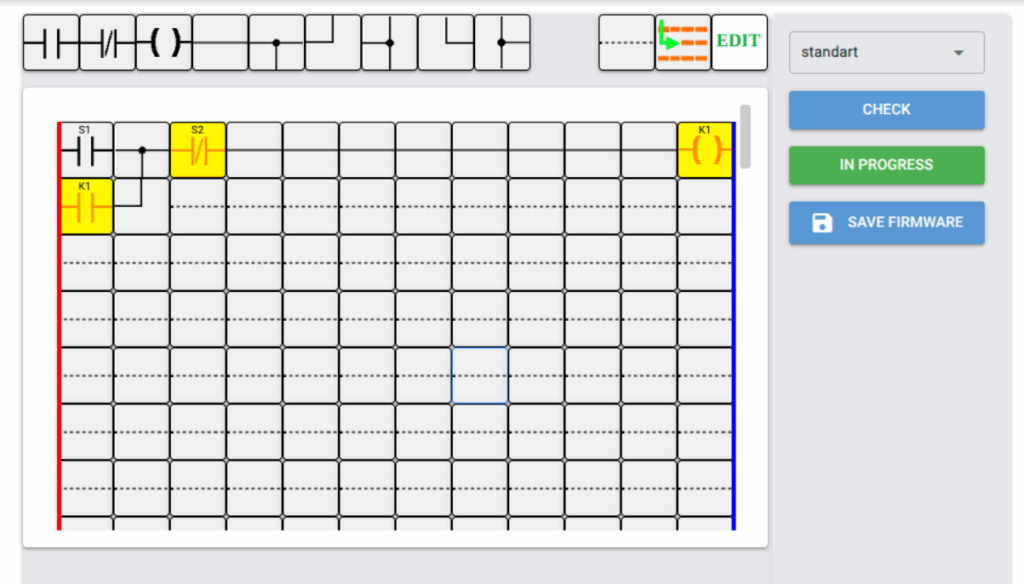
In simulation mode, the ladder diagram displayed in the workspace will change its appearance. Contacts that conduct electric current and coils that are energized will be highlighted in yellow, while contacts that are in the open state will remain uncolored.
The LD editor program will begin calculating the ladder diagram in exactly the same way as it is done in a real industrial controller. All timers, counters, and generators operate in real time. The ladder diagram is calculated line by line from top to bottom and from right to left. After completing one pass, the cycle is repeated.
If the state of any component changes, the changed state will be used in calculations until the end of the ladder diagram for all components with the same name, and also at the start of the next iteration.
It is possible to change the state of contacts designated as discrete inputs. To do this, left-click on the contact whose state needs to be changed. A contact that was conducting before the click will open, and an open contact, on the contrary, will change its state to the opposite.
Figure 1 shows the simulation process of a non-reversing starter. After pressing the START button S1, the coil K1 is energized and is held by its own contacts after releasing the S1 button. This state of the circuit is shown in the illustration. To turn off the K1 coil, press the STOP button S2; the S2 contacts will open and the K1 coil will be de-energized.
Simulation mode makes it possible for students to visually learn programmable logic controller programming using only the installed LD editor program.
Significant opportunities for experimentation are provided, which contributes to faster learning and more effective consolidation of skills in programming logic controllers using the ladder diagram language.
I recommend going to the online ladder diagram editor page and practicing in real conditions.